Server Details
To connect to our IRC server, you’ll need an IRC client. HexChat is an open source client available for a variety of platforms. mIRC is a closed source client available for Windows.
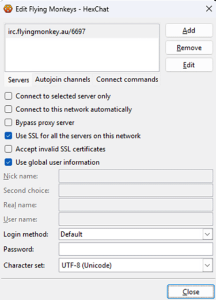 Once you’ve got an IRC Client installed, the server details you’ll need to add are as follows:
Encrypted
Server: irc.flyingmonkey.au Port: 6697 SSL Enabled
Plain Text
Server: irc.flyingmonkey.au Port: 6667 No SSL
We recommend using the encrypted port. The plain text option primarily exists for retro computing enthusiasts who might wish to connect using older computers that do not support modern encryption standards.
You can also check the documentation for your IRC client to see if it allows for scripts to run on connection. This can be useful. If you have registered via NickServ, you can run the command /msg nickserv identify [yourpassword] on login.
Once you’re connected, you can join the channel #FlyingMonkey, list the channels to find others to join, or create your own!
If you’re unsure how to add our network to HexChat, this video shows you how to do it.